The publisher's server did not answer. This is usually temporary, or your network blocks it.







Report Obby Tower
What is wrong with this game?
Are you the copyright owner? Send a takedown notice and we respond within 24 hours.
How to Play Obby Tower
- 1. Climb the TowerAscend the giant candy-colored structure by moving and jumping.
- 2. Launch and ParachuteThrow yourself off the walls and use your parachute to glide back down.
- 3. Upgrade Your WingsSpend the coins you earned in the shop to buy better wings.
To start playing Obby Tower in your internet browser, use the WASD keys on your keyboard for movement. Press the Space bar to jump as you make your way around the area. When you need to access the shop to spend your coins on better wings, press the B key on your keyboard. If you ever need to access the menu during your session, simply press the Esc key. These straightforward actions let you navigate the 3D environment and manage your upgrades without any complicated menus.
The publisher platform marks this title as a browser experience. The available information from the publisher does not state whether it is mobile ready or touch-screen compatible, so you should plan to play using a standard desktop setup with a keyboard based on the listed key bindings.
About Obby Tower
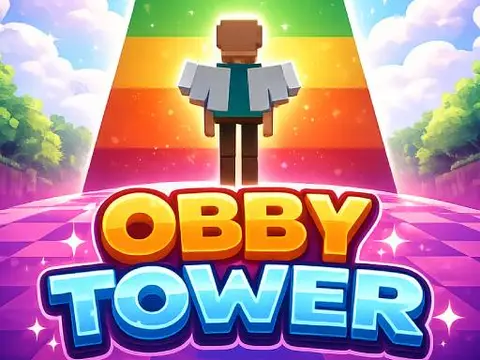
Obby Tower is a 3D browser game published on GameMonetize that places you inside a colorful virtual space reminiscent of block-building aesthetics found in Minecraft and Roblox. The core loop revolves around vertical movement, where your primary objective is to scale a giant candy-colored tower. Along the way, you interact with the environment by launching yourself off the walls and deploying a parachute to glide back down safely to the ground.
As you successfully complete descents and maneuver around the structure, you earn coins that serve as your progression currency. You can take these collected coins into the in-game shop to purchase better wings. These upgraded wings allow you to climb higher than before, which in turn helps you earn even more coins. The gameplay centers entirely on this loop of climbing, launching, gliding, earning, and upgrading your equipment to reach greater heights.
This title suits players who enjoy vertical movement challenges and collecting currencies to purchase gear upgrades within a web browser. Because the publisher details are concise, many specific elements remain unknown. The listing does not state how many total tower floors exist, whether there are distinct levels or game modes, or if any other characters are available to play. You can jump right in and find out how high you can go using the provided controls.
Obby Tower is listed on GameMonetize under .IO and 3D, with the tags .io, .io Games, 2026 games, Flight, fly, jump. The publisher does not mark it as mobile ready, so a computer with a keyboard or mouse is the safest way to play it. Obby Tower is free to play, needs no account and does not ask you to download anything.
Tips and Tricks
Focus on Coin Collection
Every descent gives you an opportunity to gather coins for your balance. Make sure to pay attention to your flight path when parachuting down so you do not miss out on earnings that could fund your next wing purchase in the shop.
Invest in Better Wings
Your main path to climbing higher relies on upgrading your equipment. Use your accumulated coins as soon as you have enough to purchase superior wings from the shop, which will grant you the reach needed for advanced ascents.
Master the Wall Launch
Launching yourself off the walls is a core part of the movement system. Practice your timing and positioning when jumping off structural surfaces to ensure your parachute deployment sets you up for a smooth glide.
Experiment with Height
Test different launch angles and glide paths to see how they affect your landing spot and coin collection. Pushing your limits on each climb will help you understand the boundaries of your current gear.
Obby Tower FAQ
Is Obby Tower free to play?
Yes, you can play this game directly in your web browser without paying any money or purchasing subscriptions, as it is hosted freely on the GameMonetize platform.
What are the game controls?
You use the WASD keys for movement, the Space bar to jump, the B key to open the shop, and the Esc key to access the menu during your session.
Can I play this game on mobile devices?
The publisher listing does not state that the game is mobile ready, so you should expect to play it on a computer using a keyboard.
What is the main goal of the game?
The main goal is to climb a giant candy-colored tower, launch off the walls, parachute down to earn coins, and buy better wings to reach higher altitudes.
Do I need to download anything to play?
No downloads are required. The game runs directly inside your internet browser window without needing any extra software or files installed on your computer.
Similar Games
If you enjoy Obby Tower, there are more games to try right now. Hole.io (grow a void hole by devouring the city, and become the biggest hole on the map); Snake.io (run as a snake, eat the food on your way and make your snake bigger); Soul Hunter (take control of a ghost and compete to capture souls in this fast-paced adventure); Break And Steal My Egg (smash massive eggs, haul them back safely, and hatch rare animals in this 3D browser game).